

What is Black Hat SEO (Search Engine Optimization)?
Before being a successful webmaster you should be master in Seo also. Today let’s know about the introduction about Blackhat Seo today.
 SEO makes use of various techniques that will help you to naturally draw traffic to your site. Professional SEO companies will help you with better content witting which involves the use of relevant keywords as per the content. They also help you to submit the links of your site to various other sites so that you can get back links to your site. If you make use of any SEO company which does its work using ethical techniques then you are sure to get higher and higher in the search engines. The main aim of Search engine Optimization is to get traffic to your website and to convert your visitors into your potential buyers.
Black Hat Search Engine Optimization (Black Hat SEO) as combination of techniques such as sneaky redirects, cloaking and invisible text that are used by SEO persons to get higher rankings in search engines in an unethical manner Black Hat SEO techniques generally break the official SEO rules and regulations. This results in poor user experience.
The various ways of doing Black Hat SEO are:
Keyword stuffing: The excess use of key words in the content is known as Keyword stuffing. In Keyword stuffing same keyword is repeated in the whole content in order to get higher ranks in the search engines.
Invisible Text: This technique is used by sites for which ethics are of no use. In this technique the keywords are made of the same color as the background so that search engine spiders can find them but are not visible to the general visitors.
Doorway pages: This technique is against the ethical SEO rules. Doorway pages are the pages that are can be seen by the search engine spiders but are invisible to the generally visitors. They are used only to get higher rankings in the search engines by tricking them. It is not a good way because it hurts the visitors who visit to the site to see some quality content but what they see is the keyword stuffed pages.
Cloaking: This method is used to cheat the search engines in order to get good ranks ion the search engines. It is done to get good rank for certain keywords. A user identified as search engine is shown a specifically prepared and optimized website with only purpose to rank well for desired keywords. If a user is not a search engine they are presented with the “real” websites content which is often spammed and of lesser quality.
Cloaking is also used to trick users to visit websites based on their description in search engines. For example a user searching for a particular product could click on a website in search engine due to its description and title. The site in question will not be the one described in SERP’s. It can be totally different or irrelevant.
RSS Spamming: Now a day’s many people use their RSS freed in comments instead of their blog’s URL. What it does is that if some visitor only wants to visit your blog to see it but due to RSS spamming he has to subscribe to your freed. By doing this their IP can be black listed from any site in a click.
Black hat SEO is not a good idea. Because Search Engine Spiders can catch you and your site can be banned from various search engine rankings. It may look like a good idea in the initial stages but for the long run it is not good at all.
Black Hat is an unfair mean of practicing SEO because it does not follow the rules and regulations followed by the ethical SEO. Black hat make search engine spiders and general visitors to visit the sites which are having poor content. This gives not a very pleasant experience to the visitors. So Black hat practice should not be used.
 Read More
Add your Comment
3
comments
Blackhat Seo: What is cloaking ?

Cloaking is a search engine optimization technique used for presentation for different forms of content to various search engines and different presentations to the users. This is a deceptive method for hood winking search engines for the purposes of getting the desired ranks for desired keywords.
When a user requests a particular web page from the site then site responds to the user with the normal web page of the site but when the same request is made by the search engine spiders then instead of the site page another page that has been specially designed for the search engine spiders is returned and the normal site page is hidden from the search engine spiders. Such a page is said to be clocked.
Cloaking is resorted to for the purposes of showing contents based on the request of IP address as well as the user agent HTTP header of the user. A user identifies search engine is exhibited a minutely prepared as well as optimized website for the purposes of ranking for desired keywords. If the user is non-search engine real websites content are shown to them.
The main purpose of cloaking is to hide the code of high ranking pages from visitors and users so that the content cannot be stolen by anybody. And to provide search engine spiders with pages which are highly optimized.

There are certain search engines which consider cloaking as spam and this sort of behaviour is against the edifice of good guidelines. Google webmaster cloaking methods as well as guidelines spell out the following.
• Cloaking for JavaScript – If any user uses enabled JavaScript it is shown one version while if the same user is using turned off JavaScript then it shows another version of a website.
• Header cloaking for HTTP referrer – If any user coming from a particular website they will be presented a cloaked version of a website based on the HTTP referrer.
• Cloaking for IP address – Cloaking system checks the IP address of the requestor. If the IP address of a search engine’s spider, the engine page will return. Cloaking uses IP address delivery, however so do other things such as geographical location for location based content. Cloaking uses IP address delivery, but IP address delivery is not itself cloaking.
• Cloaking for user agent – Based on user agent different versions of websites are delivered. If a search engine determines a script to gain access to a website based on the signature of its user agent it will show its cloak version of the website.
• Header cloaking for HTTP accept-language – It enables to show various language versions of a website without asking the users web browser language.
• Auto redirecting – Auto redirecting is also called as poor man’s cloaking. But it is not cloaking at all. This method is the same page is returning to all requestors, and does not make difference between search engine spiders and people.
Working of Cloaking
Every website contains one or more ordinary web pages. If we want a page to be cloaked in the website then we need to create another page for that particular page and is designed in such a way that it is ranked high in the search engines. If we are taking into consideration more than one search engine then a page is created for each search engine. This is done because every search engine use different algorithms and different criteria for the ranking of the web pages. So pages are designed by taken into consideration these criteria.

The pages designed for search engines are generally different from the normal content page. Sometimes a page ranks high in a particular search engine if it is stuffed with keywords. So such a page is created for the search engines.
Whenever a web page of the site is requested, a programme embedded in the site detects who is making the request. If the request is made by the normal visitor then the normal web page of the site is returned but if the search engine spider is requesting for the web page then the special page designed for search engine is returned. So in this way search engine spiders can never know the normal website page and the normal user can never know the page designed for search engines.
Cloaking is ethical
There are various views of people. Many people think that cloaking is a unethical way for reaching top position in search engine rankings. But this is not true. According to these people it is wrong because search engine is ranking the pages according to what they believe it to be and not according to what it actually is. That idea is purely a matter of principle, and nothing at all to do with ethics.
But it can be considered ethical n the way if the ranking is based on the topic or content the visitors will see the page listed in the search results and by clicking this if they get to the correct result then it is purely ethical. it doesn't matter how the page came to be ranked in that position but what matters is that the end result should be correct and ranking should be based according to the topic.
Cloaking can be used unethically, by sending people to sites and topics that they did not expect to go to when clicking on a listing in the search results, and that is an excellent reason to be against the misuse of cloaking, but it doesn't mean that cloaking is unethical. It just means that, like many other things, it has unethical uses.
Conclusion
Any type of cloaking with fraudulent purposes may result in prohibition of the search engines which makes you cautious when you are utilizing the services. Frequently, search engines hold cloaked pages by frequent visiting of search engines in timely intervals. The holders of the websites who use cloaking for securing their search engine rankings not to be taken unaware sooner or later. Supposing this process is identified web pages may be deleted temporarily or permanently from the list of various search engines.
Read More
Add your Comment
2
comments
How To Update Your Facebook Status Via ipad/ Calculator/ BlackBerry/ iPhone/ Android
How To Update Your Facebook Status Via ipad/ Calculator/ BlackBerry/ iPhone/ Android

» BlackBerry
» BlackBerry Torch
» BlackBerry PlayBook
» iPhone
» iPhone 4
» iPhone 5
» iPad
» iPad 2
» iPad 3
» Android
» Calculator

This is Really a Cool Trick, You can update Your facebook Status via BlackBerry
BlackBerry Torch BlackBerry PlayBook iPhone iPhone 4 iPhone 5 iPad iPad 2 iPad 3 Android Calculator without Having Anyone.
Update status via:
» BlackBerry
» BlackBerry Torch
» BlackBerry PlayBook
» iPhone
» iPhone 4
» iPhone 5
» iPad
» iPad 2
» iPad 3
» Android
» Calculator
Read More
Add your Comment
4
comments
Unlock IDEA Net Setter –Easiest way
Unlock IDEA Net Setter –Easiest way , some people are unlocks this net setter in 200 RS. But here i am going to tell you the actual technique to unlock IDEA Net setter. well i am also teaching you unlock all the net setter its not only for IDEA Net setter.

Things you need is :
1 Universal Master Code by THL
2 And Idea Net setter .
3 Mind :D
Well Now take your Netsetter and see its back. You can see a 15 digit number that is your Net setter IMEI number. So open Notepad and type that IMEI number into Notepad. After that plugin your Net setter and Open universal master code(which we have downloaded) and enter your IMEI number(which we have already copied into notepad) and press calculate it will generate flash and unlock code.
Now connect your USB idea net setter and install net setter software from there and run it
Also put a non IDEA SIM
It will ask you for unlock code , also it will show you that you have 10 attempts Put the unlock code generated from universal master code.
And press Enter
Read More
Add your Comment
7
comments
ESET NOD32 Antivirus & Smart Security 5.0.94.15 Final
ESET NOD32 Antivirus & Smart Security 5.0.94.15 Final
Download esat and make your computer more secure

Download esat and make your computer more secure

Download:
Download with Filesonic: (ESET NOD32 Antivirus 5.0.94.15 Final)
Download with Filesonic: (ESET NOD32 Smart Security 5.0.94.15 Final)
Read More
Add your Comment
9
comments
CorelDRAW Graphics Suite X5 15.2.0.695 (x32/x64)
CorelDRAW Graphics Suite X5 15.2.0.695 (x32/x64)
 coralDraw is the most important software for designing purpose you can design any wallpaper or abstract in coralDraw its really a amazing software.
Download

Download
Uploadstation
Read More
Add your Comment
2
comments
Free download IDM full verson
Free download IDM full version, In this verson of IDM you need not to insert serial key or crack it will never ask you any serial key .

Features of IDM are as follow
Features of IDM are as follow
- All popular browsers and applications are supported!
- Easy downloading with one click.
- YouTube grabber.(it will automatically create download panel for youtube videos)
- Automatic Antivirus checking.
- Drag and Drop.
- IDM includes web site spider and grabber.
- IDM supports many types of proxy servers.
- Download All feature.
- IDM is multilingual.
- Download Categories.
- Download Speed Acceleration.
- Download Resume.
- Simple installation wizard.
- Built-in Scheduler.
- Advanced Browser Integration.
- IDM supports main authentication protocols: Basic, Negotiate, NTLM, and Keberos.
- Download limits.
- Quick Update Feature.
Read More
Add your Comment
4
comments
Download videos from youtube
Hello friends here i am posting one amazing post is that download youtube videos.
well for that u need Internet download manager download it from here
Now install it and after that open youtube and you will see download panel that is shown in bellow pic.

Well you can see the download panel created on the top of video.
well for that u need Internet download manager download it from here
Now install it and after that open youtube and you will see download panel that is shown in bellow pic.

Well you can see the download panel created on the top of video.
Read More
Add your Comment
1 comments
enable god mode in windows 7
Hello friends here i am sharing one amazing feature of windows 7 and that is hidden show we need to open this. Lets start make a new folder anywhere you want, After that rename that folder with
GodMode.{ED7BA470-8E54-465E-825C-99712043E01C}


after that HIT enter and open that , that is your windows 7 god mode:)
GodMode.{ED7BA470-8E54-465E-825C-99712043E01C}
after that HIT enter and open that , that is your windows 7 god mode:)
Read More
Add your Comment
0
comments
Install Backtrack 5 In vmware Virtual machine
Hello friends here i am going to show you how to install backtrack 5 into virtual machine. Vmware is a tool that allows you run a virtual os like i am using Win 7 but i am also using backtrack 5 and windows xp virtually. lets start....
Things you need.
1. Vmware workstation or vmware player (well i am using vmware workstation)
2. Backtrack 5 (you can also install other os virtually )
After that install vmware workstation.

Go to home tab and select new virtual machine as shown in above figure.
After that

Select typical and press next

After that select the location of your image file if you have created DVD then select 1st option or if u have image file then select 2nd option and press browse and select your image file.After that press next

Vmware machine automatically detects that you want to install linux os. After that press NEXT.
 After that give the os name ,Here i am giving backtrack 5 and after that press next.


Now press next. after that you will see the screen as bellow

Now hit enter after that select 1st option and hit enter after that you will see screen as bellow.

Well here we need to type STARTX to enter in GUI mode (Genuine user interface ) after that you will see the screen as bellow

Now double click on "install backtrack" after you will see the screen as follow
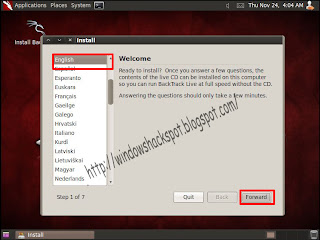
Now select the language, here i am selecting English and after that press next

After that select the region here i am selecting INDIA. after that press next.

After that select the language of keybord, here i am using default and after that press next.

After that Hit INSTALL then process will going on. In 20 min Backtrack 5 will install virtually in your PC.
Hope this artical help you :)
Learn hacking here
Things you need.
1. Vmware workstation or vmware player (well i am using vmware workstation)
2. Backtrack 5 (you can also install other os virtually )
After that install vmware workstation.

Go to home tab and select new virtual machine as shown in above figure.
After that

Select typical and press next

After that select the location of your image file if you have created DVD then select 1st option or if u have image file then select 2nd option and press browse and select your image file.After that press next

Vmware machine automatically detects that you want to install linux os. After that press NEXT.


After that enter the disk size of virtual OS here i am giving 20 gb. After that press next

Now press next. after that you will see the screen as bellow

Now hit enter after that select 1st option and hit enter after that you will see screen as bellow.

Well here we need to type STARTX to enter in GUI mode (Genuine user interface ) after that you will see the screen as bellow

Now double click on "install backtrack" after you will see the screen as follow

Now select the language, here i am selecting English and after that press next
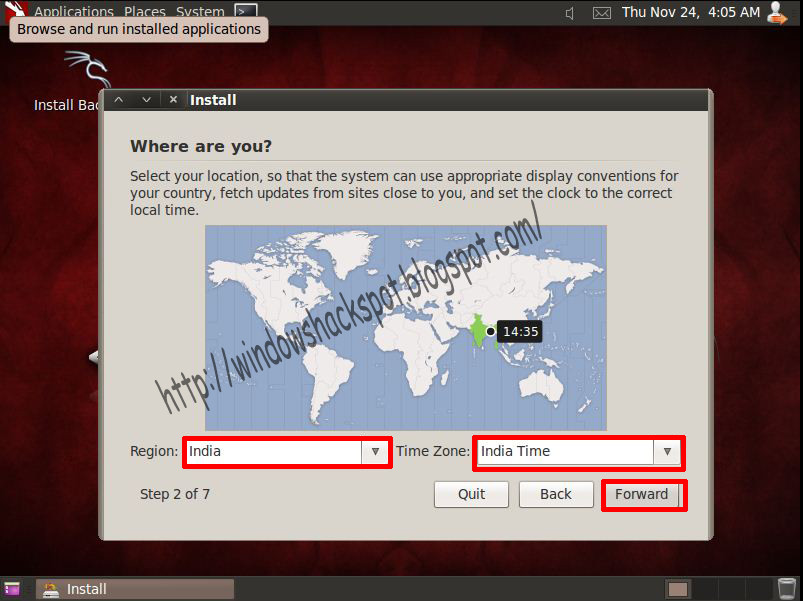
After that select the region here i am selecting INDIA. after that press next.

After that select the language of keybord, here i am using default and after that press next.

Hope this artical help you :)
Learn hacking here
Read More
Add your Comment
5
comments
Hack Windows7 administrator password
Hello friends here i am sharing hack win 7 admin pass tutorial-
I have tested this software on all the current versions of windows 7 , windows vista and on windows server 2008 . The download is an iso image of the setup.

Steps to follow
1.Get the machine to boot from CD.
2.Load drivers (usually automatic, but possible to run manual select)
3.Disk select, tell which disk contains the Windows system. Optionally you will have to load drivers.
4.PATH select, where on the disk is the system?
5.File select, which parts of registry to load, based on what you want to do.
6.Password reset or other registry edit.
7.Write back to disk (you will be asked)
Download
Read More
Add your Comment
3
comments
Activate Avast 6.0 Antivirus until 2030
My many friends have asked me that we want activation key of avast. So i have Found the key of Avast antivirus 6.0
This serial key is valid upto 2030

Note: For non-commercial usage only of Avast Free Edition. Trust me you should try this key.
Leaked Avast Key Code: W6754380R9978A0910-4TZ59467
Download
This serial key is valid upto 2030
Note: For non-commercial usage only of Avast Free Edition. Trust me you should try this key.
Leaked Avast Key Code: W6754380R9978A0910-4TZ59467
Download
Read More
Add your Comment
22
comments
Watch live tv in your laptop
Hello friends here i have found some links which helps you to watch a live movie in your laptop.
Requirements
1) INTERNET connection
2) VLC player
Open your vlc player and press ctrl+n and paste one link from bellow list and click play then you can see live TV in your laptop/pc.

http://68.68.29.39/starplus-idesitv.com
http://68.68.29.39/sony-idesitv.com
http://68.68.29.39/setmax-idesitv.com
http://68.68.29.39/zeetv-idesitv.com
http://68.68.29.39/stargold-idesitv.com
http://68.68.29.39/zeecinema-idesitv.com
http://68.68.29.39/starpravaha-idesitv.com
mms://188.165.192.130/datax/51.109.108.105.118.101.46.99.111.109.dXhBeduMPHraKYB.wsx
rtmp://live.myp2p.in/estadio54/nationalgeographic
rtmp://cp133304.live.edgefcs.net/live//channel1@62057
mms://a1637.l12455343636.c124553.a.lm.akamaistream.net/D/1637/124553/v0001/reflector:43636
http://bglive-a.bitgravity.com/ndtv/indlo/live/native
mms://live1.wm.skynews.servecast.net/skynews_wmlz_live300k
rtmp://174.36.55.124/liverepeater/brlive_0028
rtmp://live.myp2p.in/estadio54/syfy
rtmp://live.myp2p.in/estadio54/fox
rtmp://174.36.55.124/liverepeater/brlive_0028
rtmp://live.myp2p.in/estadio54/foxmovies
rtmp://media2.lsops.net/dwtv2//13010dwtveu364
rtmp://live.myp2p.in/estadio54/nationalgeographic
rtmp://live.myp2p.in/estadio54/odisseia
rtmp://live.myp2p.in/estadio54/sicmulher
rtmp://live.myp2p.in/estadio54/sickids
rtmp://live.myp2p.in/estadio54/tvi
rtmp://213.13.26.11/live/estadio/estadiovirtual
rtmp://live.myp2p.in/estadio54/hollywood
rtmp://h2c.rtp.pt/livetv//2ch80h264
rtsp://217.146.95.166:554/live/ch11yqcif.3gp
rtsp://217.146.95.166:554/live/ch13yqcif.3gp
rtsp://217.146.95.166:554/live/ch35yqcif.3gp
Make a comment if you like it!!
Read More
Add your Comment
6
comments
How to bypass cyberom security
In my college server cyberom is configured by admin and the most popular sites like facebook , youtube ,orkut etc. are blocked in the cyberom.
And i have found one trick to bypass cyberom security so here i am sharing it with you.
Follow the steps
1.log in using internet explorer

2. After that open mozilla firefox and in firefox go to tools>option>advanced>network>setting

3. In that option select manual proxy configuration.
click here to get proxy and after getting proxy put it in HTTP proxy: and port :
and after doing that try to open google if you can open google then proxy works otherwise select new proxy and try again.
If you can access google then you can open facebook or other sites which you want to open.
And this proxy is invisible to administrator .
if you dnt want to use proxy then download Hotspot Shield and log in in cyberom and connect Hotspot Shield.
(This info is educational purpose only i am not responsible for any kind of trouble use it at your own risk!! )
Read More
Add your Comment
0
comments
Remove Windows Genuine Notification
I found out this method of removal of Windows Genuine Notification :
Here is how I did it :
- Launch Windows Task Manager.
- End wgatray.exe process in Task Manager.
- Restart Windows XP in Safe Mode.
- Delete WgaTray.exe from C:\Windows\System32.
- Delete WgaTray.exe from C:\Windows\System32\dllcache.
- Launch RegEdit.
- Browse to the following location: HKEY_LOCAL_MACHINE\SOFTWARE\Microsoft\Windows NT\CurrentVersion\Winlogon\Notify
- Delete the folder WgaLogon and all its contents
- Reboot Windows XP.
Here is how I did it :
- Ignore Step #2 of ending wgatray.exe before restarting to Safe Mode as it serves no purpose.
- At Step #4, wait on the deletion confirmation dialog box and then open task manager to end wgatray.exe
- When you are again prompted for a confirmation for terminating the process, align that confirmation box over the delete confirmation box.
- Press Yes on the Task Manager prompt and then quickly press Yes on the deletion confirmation. (You need to repeat this if you miss it)
- If you did it quickly then you will be able to delete the file.
- Step #5 can be missed. I was able to do it without the Step #5.
- Complete Step 6 to 9 as instructed.
- Go to Control Panel > Security Center > Automatic Update Settings.
- Select the third option “Notify me but don’t automatically download or install them“.
- Click Ok.
- Now when Windows Updates icon will appear in the system tray (it will take some time), click on the icon and it will display a list of available updates.
- This time unselect the checkbox of Windows Genuine Advantage Notification Tool, and click on Download.
- Select “Don’t notify my about these updates again” so it will ignored every time updates are downloaded.
- From the next time, make sure to check the list of download so that you might not install any new version of this tool.
 Read More
Add your Comment
1 comments
Run C++ Compiler Fullscreen in Windows 7
This is a big question for those who are still using Turbo C++ Version 3.0 in Windows Vista and Win 7. As everyone knows that full screen is not supported with the version 3.0 in Vista and windows7 it is ridiculous to work in the small screen where I think no one can ever imagine writing a program there! This solution will help all the C, C++ learners using TC++ 3.0 in Vista and Windows 7.
Now lets trick this...
There are 2ways:
1. By changing the Properties
So now after opening the CMD, now click on the logo image of CMD at left top corner of the window, you wil be opened with a set of Options. Now click on Properties.
Now a window will be opened. Change the parameters as in the image:
And now goto Layout tab and change as:
Now click OK and thats it now you have a full screen CMD, now open Compiler and continue your Programming.

2. Using DOS Box tool
DOSBox is a DOS-emulator that uses the SDL-library which makes DOSBox very easy to port to different platforms. DOSBox has already been ported to many different platforms, such as Windows, BeOS, Linux, MacOS X.
So after downloading this tool you will be needed to mount the harddrive which has the Compiler in it..
First Open the DOS BOX application which will be same as our Command Prompt window.
Now type in,
MOUNT C C:\TC\BIN\
Here C is the name of the Drive and C:\TC\BIN\ is the address where the compiler is located.
Now Just type TC and hit ENTER and thats it now you have a full screen Compiler in Win7 or Win Vista.
click here to download DOS BOX
Read More
Add your Comment
0
comments
How to increase your RAM using pen drive.
Hello friends here i am posting one amazing post is that how to use pendrive as a RAM.
The basic idea is to use your Pendrive as a virtual memory. After doing this setting if your computer’s internal
RAM is full then your computer will use the memory available in pendrive to store the data as RAM.
But please note that as the Input Output speed of your port connecting Pendrive might not be as fast as the RAM’s
port your computer might respond a little slow if the RAM is full and it uses your pendrive as RAM. But it’s better to
keep your computer running using pendrive as Ram rather than closing programs due to lack of RAM space.

Now:
1> Right click on your “My Computer” and click on “Properties”.
2> Now click on “Advanced”and then click on “Performance” setting.
3> Now click on “Advanced” and click on the “Change” button below virtual memory.
4> Now select your Pendrive below and choose the option “Custom size”.
5> As your last step view the memory available in your pendrive and write it down
in the “Initial size” and “Maximum size” filed. and click on “OK”.
So now you are done.
Now your pendrive will be used as your RAM.
The basic idea is to use your Pendrive as a virtual memory. After doing this setting if your computer’s internal
RAM is full then your computer will use the memory available in pendrive to store the data as RAM.
But please note that as the Input Output speed of your port connecting Pendrive might not be as fast as the RAM’s
port your computer might respond a little slow if the RAM is full and it uses your pendrive as RAM. But it’s better to
keep your computer running using pendrive as Ram rather than closing programs due to lack of RAM space.
So How to do this?
First of all connect your pendrive to your computer.Now:
1> Right click on your “My Computer” and click on “Properties”.
2> Now click on “Advanced”and then click on “Performance” setting.
3> Now click on “Advanced” and click on the “Change” button below virtual memory.
4> Now select your Pendrive below and choose the option “Custom size”.
5> As your last step view the memory available in your pendrive and write it down
in the “Initial size” and “Maximum size” filed. and click on “OK”.
So now you are done.
Now your pendrive will be used as your RAM.
Read More
Add your Comment
0
comments
Make a free call any where in the world
Things that you will need
1. adobe flash player 9 or higher
2. Head phone with mic.
Note : you can make only one call using an ip in a Day. But it can be exceeded if you have dynamic IP like BSNL broadband then disconnect your internet connection and call again you will able to make another call.
now,
open your browser and visit the following link :
www.evaphone.com
then the screen is like as follow.

now enter the country code and phone number which you want to call.
then click on green button and then click on the under advertise then your call will be connected.
Read More
Add your Comment
0
comments
Want to Work for Facebook ??
From the last few months Facebook and Google both are expanding their business at very large scale, First there was Video Calling and Group Chat feature in Facebook, Google come with Google+ and with New Gmail Login Page. But now Facebook is hiring new people to expand and develop new technology and features to challenge it's biggest rival on earth i.e. Google+. So there is a very big chance to get a job in Facebook. They want the peoples like Software Engineers, Product Management, Design Engineers, Sales and Business Development, Technical Operation, HR, Product Marketing, IT & Security and even Online Operations. Here are the steps how you can get in Facebook:-
1). First Login to your Facebook Account and then go to www.facebook.com/careers. it will look like this.

Before applying for any kind of job you should must be aware of what you will get there i.e. what kind of Life Style will be there and benefits. For more information click on the Benefits+Perks button.
2). Choose your field in which you are expert and want a job from Careers. For now we will take IT & Security. Click on the IT & Security and choose Your Section from it, we will take Security Engineer.
3). Read all the Responsibilities and Requirement for the job and click on the Apply for this postion.

4). Fill your all the information in the Application Form and Upload your Resume. After filling the form please recheck it and then click on the Submit Application button.
That's it you have now applied for the job in Facebook.. Great.. :)
Read More
Add your Comment
0
comments


